> For the complete documentation index, see [llms.txt](https://onenesss-organization.gitbook.io/jj-xiaoce/llms.txt). Markdown versions of documentation pages are available by appending `.md` to page URLs; this page is available as [Markdown](https://onenesss-organization.gitbook.io/jj-xiaoce/next.js-kai-fa-zhi-nan/33.-api-pian-next.config.js-shang.md).

# 33. API 篇 ❘ next.config.js（上）

### 前言

Next.js 可以通过根目录的 `next.config.js` 进行配置：

```javascript
/** @type {import('next').NextConfig} */
const nextConfig = {
  /* config options here */
}
 
module.exports = nextConfig
```

正如文件的扩展名是 `.js`，`next.config.js` 是一个常规的 Node.js 模块，而不是一个 JSON 文件。它会在 Next.js server 和构建阶段被用到，并且不包含在浏览器构建中（代码不会打包到客户端）。

如果你需要 ECMAScript 模块，你可以使用 `next.config.mjs`：

```javascript
/**
 * @type {import('next').NextConfig}
 */
const nextConfig = {
  /* config options here */
}
 
export default nextConfig
```

你也可以使用一个函数：

```javascript
export default (phase, { defaultConfig }) => {
  /**
   * @type {import('next').NextConfig}
   */
  const nextConfig = {
    /* config options here */
  }
  return nextConfig
}
```

从 Next.js 12.1.0 起，你还可以使用一个异步函数：

```javascript
module.exports = async (phase, { defaultConfig }) => {
  /**
   * @type {import('next').NextConfig}
   */
  const nextConfig = {
    /* config options here */
  }
  return nextConfig
}
```

其中 `phase` 表示配置加载的当前上下文。通过[查看源码](https://github.com/vercel/next.js/blob/5e6b008b561caf2710ab7be63320a3d549474a5b/packages/next/shared/lib/constants.ts#L19-L23)，可以知道 `phase` 的值一共有 5 个：

```javascript
export const PHASE_EXPORT = 'phase-export'
export const PHASE_PRODUCTION_BUILD = 'phase-production-build'
export const PHASE_PRODUCTION_SERVER = 'phase-production-server'
export const PHASE_DEVELOPMENT_SERVER = 'phase-development-server'
export const PHASE_TEST = 'phase-test'
```

可以通过 `next/constants` 导入，根据不同的阶段进行自定义配置：

```javascript
const { PHASE_DEVELOPMENT_SERVER } = require('next/constants')
 
module.exports = (phase, { defaultConfig }) => {
  if (phase === PHASE_DEVELOPMENT_SERVER) {
    return {
      /* 这里放 development 配置选项 */
    }
  }
 
  return {
    /* 除了 development 阶段的其他阶段的配置 */
  }
}
```

在这个例子中，注释行的地方就是你可以放配置的地方，实际上，Next.js 定义的配置非常多，可以查看[源码配置文件](https://github.com/vercel/next.js/blob/canary/packages/next/src/server/config-shared.ts)。

然而，这些配置又都不是必须的，也没有必要清楚的了解每个配置的作用，大致看一下，有个印象即可，需要用到的时候再去细查。

因为要讲解的配置有 36 个，内容繁琐细节且庞大，所以 `next.config.js` 的配置部分拆分为上下两篇。上篇讲解请求相关的 headers、redirects、rewrites，这是 Next.js 中常用的配置，且内容有很多相似之处，放在一起方便触类旁通。下篇讲解剩余的 33 个配置，每个配置内容都不多，了解即可。

现在让我们开始学习吧！

### 1. headers

#### 1.1. 介绍

Headers 用于设置自定义 HTTP 标头，使用 `next.config.js` 的 `headers`字段：

```javascript
module.exports = {
  async headers() {
    return [
      {
        source: '/about',
        headers: [
          {
            key: 'x-custom-header',
            value: 'my custom header value',
          },
          {
            key: 'x-another-custom-header',
            value: 'my other custom header value',
          },
        ],
      },
    ]
  },
}
```

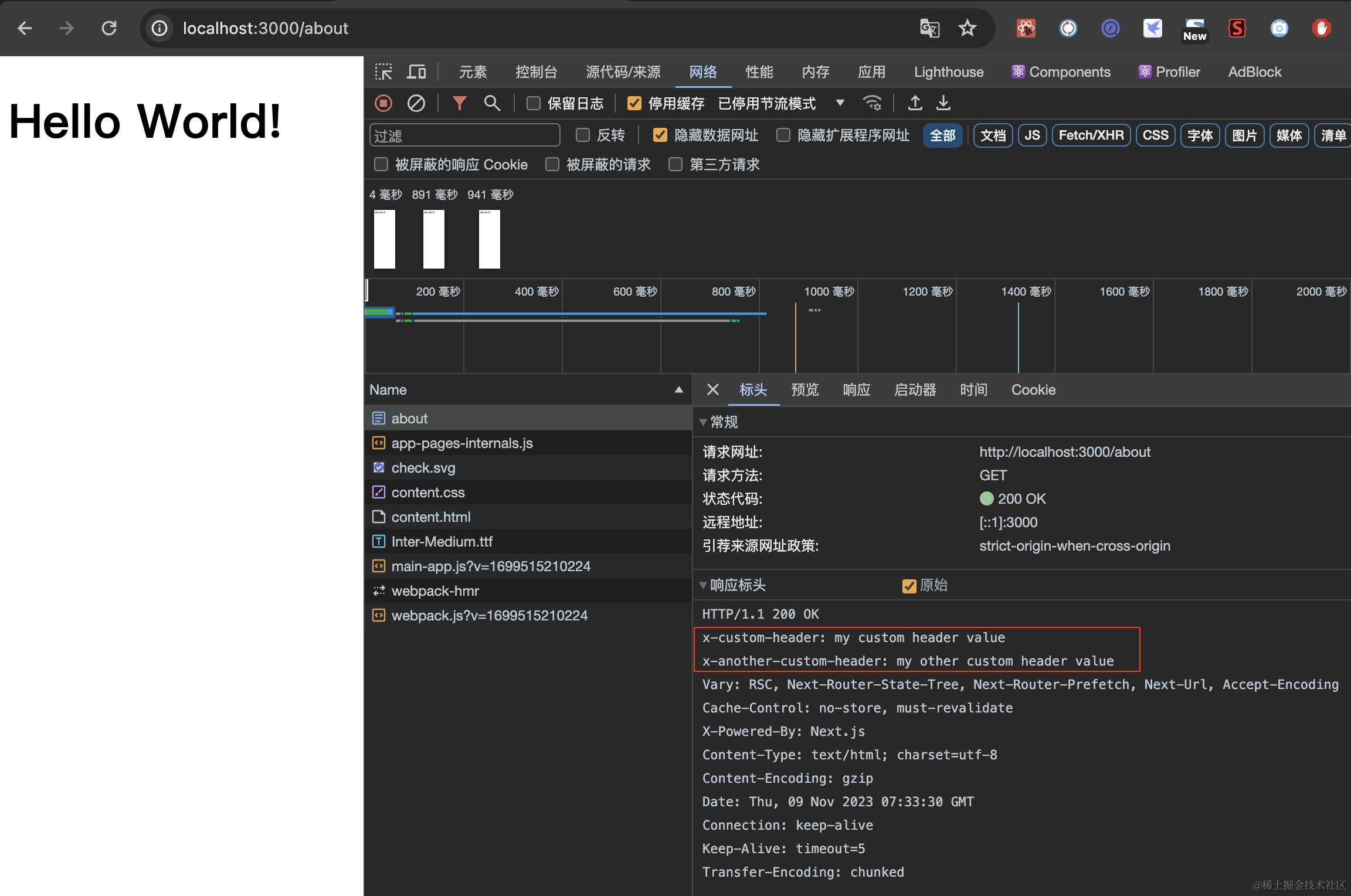
此时访问 `/about`，可以看到：

![截屏2023-11-09 下午3.40.56.png](https://p3-juejin.byteimg.com/tos-cn-i-k3u1fbpfcp/ca0818d69f76450182e9e9834080e0eb~tplv-k3u1fbpfcp-jj-mark:0:0:0:0:q75.image#?w=2304\&h=1528\&s=400155\&e=png\&b=2a2a2a)

`headers`是一个异步函数，该函数返回一个包含 `soruce` 和 `headers` 属性的对象数组，其中：

* `source` 表示传入的请求路径
* `headers` 是一个包含 key 和 value 属性的响应标头对象数组

除了这两个值外，还可以设置：

* `basePath`：`false` 或者 `undefined`。当值为 `false` ，匹配时不会包含 `basePath`，只能用于外部重写
* `locale`：`false` 或者 `undefined`，匹配时是否应该包含 locale
* `has`：一个有 `type`、`key`、`value` 属性的对象数组
* `missing`：一个有 `type`、`key`、`value` 属性的对象数组

headers 会在文件系统（包括页面和 `/public` 文件）之前被触发。

这些字段我们来一一举例介绍。

#### 1.2. source

source 表示传入的请求路径，除了可以匹配具体的值，还支持三种匹配模式：

**路径匹配**

普通的路径匹配，举个例子，`/blog:slug` 会匹配 `/blog/hello-world`（无嵌套路径，也就是说 `/blog/hello-world/about`不会匹配）

```javascript
// next.config.js
module.exports = {
  async headers() {
    return [
      {
        source: '/blog/:slug',
        headers: [
          {
            key: 'x-slug',
            value: ':slug', // 匹配参数可以在 value 中使用
          },
          {
            key: 'x-slug-:slug', // 匹配参数可以在 key 中使用
            value: 'my other custom header value',
          },
        ],
      },
    ]
  },
}
```

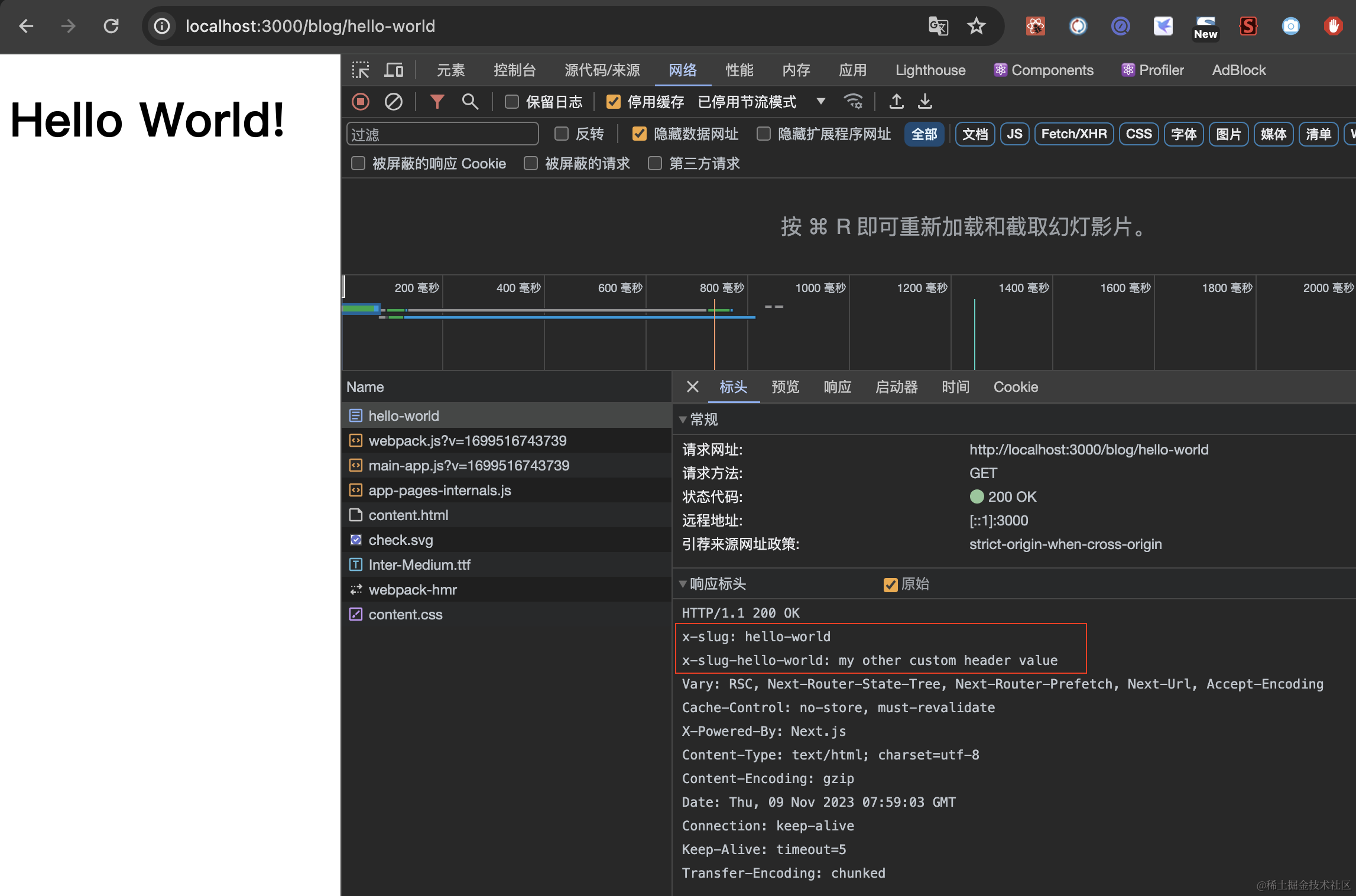
访问 `/blog/hello-world`，可以看到：

![截屏2023-11-09 下午4.00.05.png](https://p3-juejin.byteimg.com/tos-cn-i-k3u1fbpfcp/f430b2c5e9a44a7d88dcaf32a3bdbad9~tplv-k3u1fbpfcp-jj-mark:0:0:0:0:q75.image#?w=2294\&h=1516\&s=410172\&e=png\&b=2a2a2a)

但访问 `/blog/hello-world/about`就不会有自定义标头。

**通配符路径匹配**

在参数后使用 `*` 实现通配符路径匹配，举个例子：`/blog/:slug*` 会匹配 `/blog/a/b/c/d/hello-world`：

```javascript
// next.config.js
module.exports = {
  async headers() {
    return [
      {
        source: '/blog/:slug*',
        headers: [
          {
            key: 'x-slug',
            value: ':slug*',
          },
          {
            key: 'x-slug-:slug*',
            value: 'my other custom header value',
          },
        ],
      },
    ]
  },
}
```

访问 `/blog/hello-world/about`，可以看到：

![image.png](https://p3-juejin.byteimg.com/tos-cn-i-k3u1fbpfcp/72fc974d27674c02a4e40057c49cc1ac~tplv-k3u1fbpfcp-jj-mark:0:0:0:0:q75.image#?w=786\&h=84\&s=20629\&e=png\&b=282828)

访问 `/blog/hello-world` 也是有的：

![image.png](https://p3-juejin.byteimg.com/tos-cn-i-k3u1fbpfcp/0c5756cc8262461a945a66436db9ee92~tplv-k3u1fbpfcp-jj-mark:0:0:0:0:q75.image#?w=700\&h=88\&s=17996\&e=png\&b=282828)

**正则表达式路径匹配**

在参数后用括号将正则表达式括住实现正则表达式匹配，举个例子：`blog/:slug(\\d{1,})` 匹配 `/blog/123` 而不匹配 `/blog/abc`

```javascript
// next.config.js
module.exports = {
  async headers() {
    return [
      {
        source: '/blog/:post(\\d{1,})',
        headers: [
          {
            key: 'x-post',
            value: ':post',
          },
        ],
      },
    ]
  },
}
```

访问 `/blog/123`，可以看到：

![image.png](https://p3-juejin.byteimg.com/tos-cn-i-k3u1fbpfcp/0738859e301945d9967e538636722a43~tplv-k3u1fbpfcp-jj-mark:0:0:0:0:q75.image#?w=402\&h=52\&s=7281\&e=png\&b=282828)

注意：这 8 个字符 `(`、`)`、 `{`、 `}`、 `:`、 `*`、 `+`、 `?` 都会用于正则表达式匹配，所以需要用到这些字符本身的时候，使用 `\\`转义

```javascript
// next.config.js
module.exports = {
  async headers() {
    return [
      {
        // 匹配 `/english(default)/something`
        source: '/english\\(default\\)/:slug',
        headers: [
          {
            key: 'x-header',
            value: 'value',
          },
        ],
      },
    ]
  },
}
```

#### 1.3. headers

headers 无须多说，我们聊聊 headers 的覆盖行为。

如果两个 headers 匹配相同的路径以及设置了相同的 header key，最后一个 header 的 key 会覆盖前一个。举个例子：

```javascript
// next.config.js
module.exports = {
  async headers() {
    return [
      {
        source: '/:path*',
        headers: [
          {
            key: 'x-hello',
            value: 'there',
          },
        ],
      },
      {
        source: '/hello',
        headers: [
          {
            key: 'x-hello',
            value: 'world',
          },
        ],
      },
    ]
  },
}
```

在这个例子中，当访问 `/hello` 时，既匹配 `/:path*`，又匹配 `/hello`，而两个 source 对应设置的 `x-hello` 的 key 值不同，因为`/hello` 是最后一个 header，所以最终的值是 `world`。

那如果匹配了相同的路径，但设置的 header key 不冲突呢？那就都会添加，举个例子：

```javascript
module.exports = {
  async headers() {
    return [
      {
        source: '/:path*',
        headers: [
          {
            key: 'hello',
            value: 'hello',
          },
          {
            key: 'hello2',
            value: 'hello2',
          }
        ],
      },
      {
        source: '/hello',
        headers: [
          {
            key: 'hello',
            value: 'world',
          },
          {
            key: 'hello3',
            value: 'hello3',
          },
        ],
      },
    ]
  },
}
```

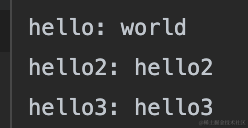
最终的结果为：

![image.png](https://p3-juejin.byteimg.com/tos-cn-i-k3u1fbpfcp/ea5a1ecfec794a40b85c6684899f2914~tplv-k3u1fbpfcp-jj-mark:0:0:0:0:q75.image#?w=248\&h=128\&s=11341\&e=png\&b=282828)

#### 1.4. basePath

`basePath`的值为 `false` 或者 `undefined`。当值为 `false` ，匹配时不会包含 `basePath`，举个例子：

```javascript
// next.config.js
module.exports = {
  basePath: '/docs',
 
  async headers() {
    return [
      {
        source: '/with-basePath', // 匹配 /docs/with-basePath
        headers: [
          {
            key: 'x-hello',
            value: 'world',
          },
        ],
      },
      {
        source: '/without-basePath', // 匹配 /without-basePath
        headers: [
          {
            key: 'x-hello',
            value: 'world',
          },
        ],
        basePath: false, // 因为设置了 false
      },
    ]
  },
}
```

在这个例子中，设置了 `basePath` 为 `/docs`，正常 headers 中的 source 会匹配 basePath + source 构成的链接，除非你设置了 `basePath` 为 `false`。

#### 1.5. locale

`locale` 的值为 `false` 或者 `undefined`，决定匹配时是否应该包含 locale，其实效果跟 basePath 类似.

考虑到部分同学对 `locale` 不太熟悉，我们先简单的讲下 `locale`配置项，locale 的作用就是国际化（i18n），`next.config.js` 针对 Pages Router 提供了 i18n 配置项，注意是在 Pages Router 下，在 App Router 下 Next.js 已经不再提供直接的支持，具体内容查看小册国际化章节。

比如我们在 `pages` 目录下新建一个 `article.js` 文件：

```javascript
// pages/article.js
export default function Home() {
  return  <h1>Hello Article!</h1>
}
```

然后 `next.config.js` 修改配置项：

```javascript
// next.config.js
module.exports = {
  i18n: {
    locales: ['en', 'fr', 'de', 'zh'],
    defaultLocale: 'zh',
  }
}
```

此时，访问 `/en/article`、`/fr/article`、`/de/article` 都会重写为 `/article`，注意是重写，就是路由地址不变，但内容是 `/article`的内容。访问 `/zh/article` 会重定向到 `/article`。

而如果你在 `app/article`目录下新建一个 `article.js` 文件，文件内容同上。

此时，访问 `/en/article`、`/fr/article`、`/de/article` 都会 404 错误。访问 `/zh/article` 会重写为 `/article`。说明在 App Router 下只有 `i18n.defaultLocale` 是生效的。

好了，基本介绍完毕，主要是为了让大家了解配置项中的 i18n 的作用。我们再看 headers 中的 locales 设置，举个例子：

```javascript
module.exports = {
  i18n: {
    locales: ['en', 'fr', 'de'],
    defaultLocale: 'en',
  },
 
  async headers() {
    return [
      {
        // 自动处理所有的 locales
        // 也就是 `/en/with-locale`、`/fr/with-locale`、`/de/with-locale`、`/with-locale` 都会匹配
        source: '/with-locale', 
        headers: [
          {
            key: 'x-hello',
            value: 'world1',
          },
        ],
      },
      {
        // 因为 locale 设置为 false，所以不会自动处理 locales
        // 也就是只匹配 `/nl/with-locale-manual`
        source: '/nl/with-locale-manual',
        locale: false,
        headers: [
          {
            key: 'x-hello',
            value: 'world2',
          },
        ],
      },
      {
        // 匹配 '/' 因为 `en` 是 defaultLocale
        // 也就是只匹配 `/`、`/en`
        source: '/en',
        locale: false,
        headers: [
          {
            key: 'x-hello',
            value: 'world3',
          },
        ],
      },
      {
        // 会转换为 /(en|fr|de)/(.*) 所以不会匹配顶层
        // 也就是 `/` 和 `/fr` 都不会匹配到
        // 如果要匹配到这两个，可以用 `/:path*`
        source: '/(.*)',
        headers: [
          {
            key: 'x-hello',
            value: 'world4',
          },
        ],
      },
    ]
  },
}
```

注意，虽然 i18n.locales 配置在 App Router 下不生效，但这也只是导致页面出现 404 错误而已，并不会影响处理标头，即便页面 404，你可以正常的查看标头。

#### 1.6. has 和 missing

`has` 和 `missing` 是用来处理请求中的 header、cookie 和请求参数是否匹配某些字段，或者不匹配某些字段的时候，才应用 header。

举个例子，比如请求 `/article?id=1&author=yayu`，`has` 可以要求请求中必须有 id 参数，或者 id 参数等于 xxx 的时候才返回某个标头。`missing` 可以要求请求中必须没有 id 参数，或者 id 参数不等于 xxx 的时候才返回某个标头。

`has` 和 `missing` 对象有下面这些字段：

* `type`: `String`类型，值为 `header`、`cookie`、`host`、`query` 之一
* `key`: `String`类型，所选类型（也就是上面的四种值）中要匹配的 key
* `value`： `String` 或者 `undefined`，要检查的值。如果值为 `undefiend`，任何值都不会匹配。支持使用一个类似正则的字符串捕获值的特殊部分。比如 `first-(?<paramName>.*)`用于匹配 `first-second`，然后就可以用 `:paramName`获取 `second` 这个值

听起来有些复杂，看个例子其实就懂了：

```javascript
// next.config.js
module.exports = {
  async headers() {
    return [
      // 如果 header 中 `x-add-header` 字段存在
      // 那就返回 `x-another-header` 标头
      {
        source: '/:path*',
        has: [
          {
            type: 'header',
            key: 'x-add-header',
          },
        ],
        headers: [
          {
            key: 'x-another-header',
            value: 'hello',
          },
        ],
      },
      // 如果 header 中 `x-no-header` 字段不存在
      // 就返回 `x-another-header` 标头
      {
        source: '/:path*',
        missing: [
          {
            type: 'header',
            key: 'x-no-header',
          },
        ],
        headers: [
          {
            key: 'x-another-header',
            value: 'hello',
          },
        ],
      },
      // 如果 source、query、cookie 都匹配
      // 就返回 `x-authorized` 标头
      {
        source: '/specific/:path*',
        has: [
          {
            type: 'query',
            key: 'page',
            value: 'home',
          },
          {
            type: 'cookie',
            key: 'authorized',
            value: 'true',
          },
        ],
        headers: [
          {
            key: 'x-authorized',
            value: 'hello',
          },
        ],
      },
      //如果 header 中 `x-authorized` 存在且等于 yes 或 true
      // 就返回 `x-another-header` 标头
      {
        source: '/:path*',
        has: [
          {
            type: 'header',
            key: 'x-authorized',
            value: '(?<authorized>yes|true)',
          },
        ],
        headers: [
          {
            key: 'x-another-header',
            value: ':authorized',
          },
        ],
      },
      // 如果 host 是 `example.com`,
      // 应用 header
      {
        source: '/:path*',
        has: [
          {
            type: 'host',
            value: 'example.com',
          },
        ],
        headers: [
          {
            key: 'x-another-header',
            value: 'hello',
          },
        ],
      },
    ]
  },
}
```

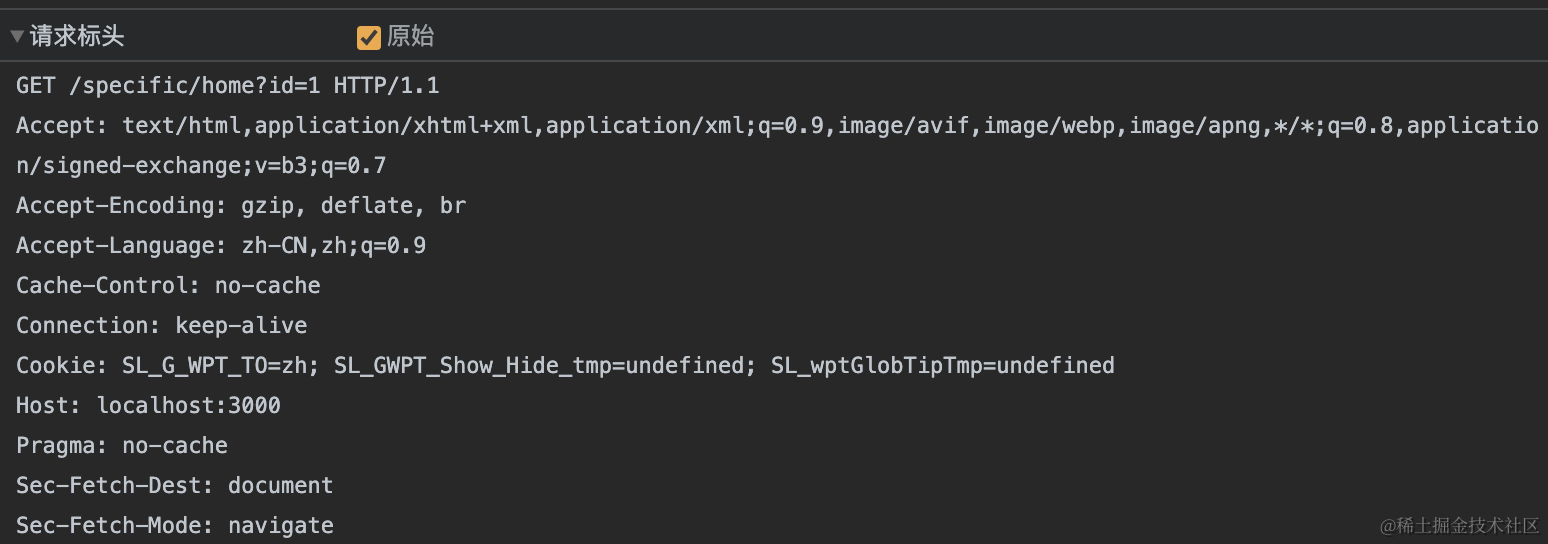
注意，has 和 missing 判断的都是请求头中的值。 type 的四种类型为 header、cookie、host、query，其中下图中的值都是 header：

![image.png](https://p3-juejin.byteimg.com/tos-cn-i-k3u1fbpfcp/f286f2e743624f39b7f0ab7678bc7a10~tplv-k3u1fbpfcp-jj-mark:0:0:0:0:q75.image#?w=1548\&h=544\&s=121143\&e=png\&b=282828)

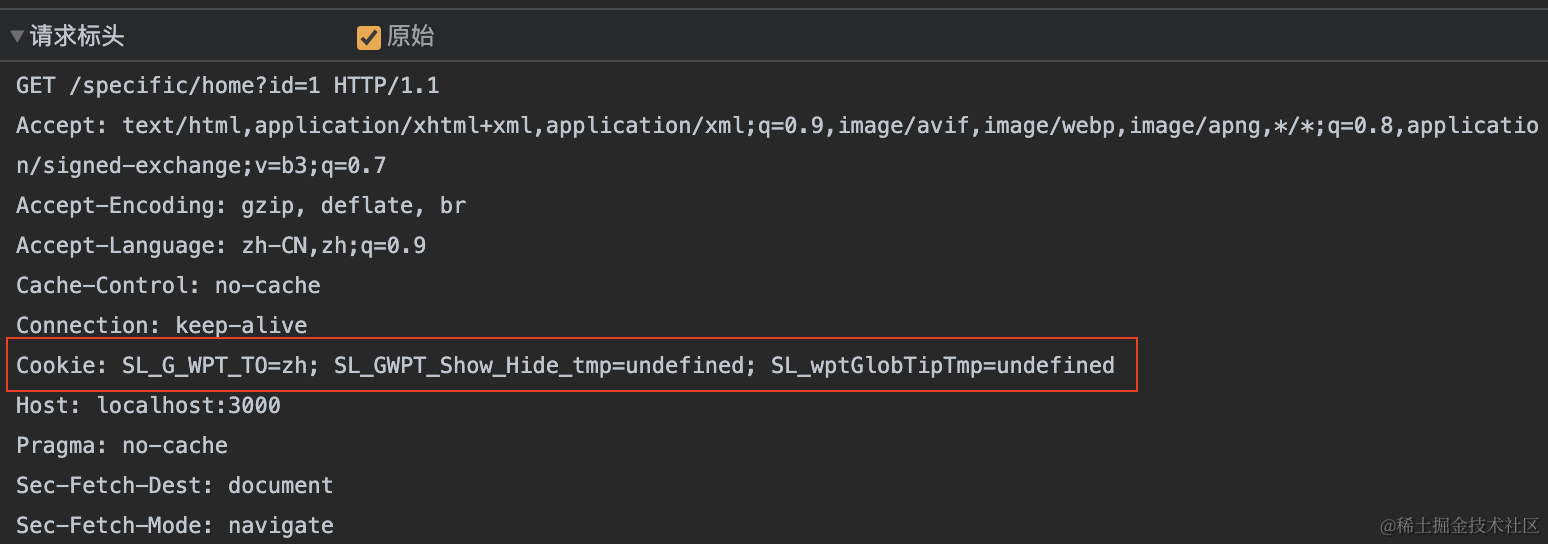
cookie 指的是其中的 Cookie 标头，Next.js 已经自动做了解析，所以可以直接判断 Cookie 中的字段值：

![image (1).png](https://p3-juejin.byteimg.com/tos-cn-i-k3u1fbpfcp/1b0f0c3bde944941b01ece1cd01f43c0~tplv-k3u1fbpfcp-jj-mark:0:0:0:0:q75.image#?w=1548\&h=544\&s=118810\&e=png\&b=282828)

host 就是主机名 + 端口，query 表示参数。以 `'http://user:pass@host.com:8080/p/a/t/h?query=string#hash'`为例的话，**host** 的值为 `host.com:8080`。**query** 为 `query=string`。

#### 1.7. Cache-Control

你不能在 `next.config.js` 中为页面或静态资源设置 `Cache-Control`标头，因为该标头会在生产中被覆盖，以确保有效缓存响应和静态资源。

#### 1.8. 选项

**X-DNS-Prefetch-Control**

[X-DNS-Prefetch-Control](https://developer.mozilla.org/zh-CN/docs/Web/HTTP/Headers/X-DNS-Prefetch-Control) 头控制着浏览器的 DNS 预读取功能。DNS 预读取是一项使浏览器主动去执行域名解析的功能，其范围包括文档的所有链接，无论是图片的，CSS 的，还是 JavaScript 等其他用户能够点击的 URL。

因为预读取会在后台执行，所以 DNS 很可能在链接对应的东西出现之前就已经解析完毕。这能够减少用户点击链接时的延迟。

```json
{
  key: 'X-DNS-Prefetch-Control',
  value: 'on'
}
```

**Strict-Transport-Security**

[Strict-Transport-Security](https://developer.mozilla.org/zh-CN/docs/Web/HTTP/Headers/Strict-Transport-Security)（通常简称为 HSTS）响应标头用来通知浏览器应该只通过 HTTPS 访问该站点，并且以后使用 HTTP 访问该站点的所有尝试都应自动重定向到 HTTPS。

使用下面的配置，所有当前和未来的子域都将使用 `max-age` 为 2 年的 HTTPS：

```javascript
{
  key: 'Strict-Transport-Security',
  value: 'max-age=63072000; includeSubDomains; preload'
}
```

**X-Frame-Options**

[X-Frame-Options](https://developer.mozilla.org/zh-CN/docs/Web/HTTP/Headers/X-Frame-Options) HTTP 响应头是用来给浏览器指示允许一个页面可否在 `<frame>`、`<iframe>`、`<embed>` 或者 `<object>` 中展现的标记。站点可以通过确保网站没有被嵌入到别人的站点里面，从而避免点击劫持 (en-US)攻击。

此标头已经被 [frame-ancestors](https://developer.mozilla.org/zh-CN/docs/Web/HTTP/Headers/Content-Security-Policy/frame-ancestors) 替代，它在现代浏览器中有更好的支持。

**Permissions-Policy**

[Permissions-Policy](https://developer.mozilla.org/zh-CN/docs/Web/HTTP/Headers/Permissions-Policy) 响应标头提供了一种可以在本页面或包含的 iframe 上启用或禁止浏览器特性的机制，之前叫做 `Feature-Policy`。

```json
{
  key: 'Permissions-Policy',
  value: 'camera=(), microphone=(), geolocation=(), browsing-topics=()'
}
```

**X-Content-Type-Options**

如果 `Content-Type` 标头没有被显示设置，[X-Content-Type-Options](https://developer.mozilla.org/zh-CN/docs/Web/HTTP/Headers/X-Content-Type-Options) 会阻止浏览器尝试猜测内容类型。这可以防止允许用户上传和共享文件的网站受到 XSS 攻击。

这个标头只有一个有效值是 `nosniff`。

```json
{
  key: 'X-Content-Type-Options',
  value: 'nosniff'
}
```

**Referrer-Policy**

[Referrer-Policy](https://developer.mozilla.org/zh-CN/docs/Web/HTTP/Headers/Referrer-Policy) 控制当从当前网页导航到另一个网页时携带的信息内容：

```json
{
  key: 'Referrer-Policy',
  value: 'origin-when-cross-origin'
}
```

### 2. redirects

#### 2.1. 介绍

重定向，顾名思义，将请求路径重定向到其他目标路径。配置重定向，使用 `next.config.js` 的 `redirects`，示例如下：

```javascript
module.exports = {
  async redirects() {
    return [
      {
        source: '/about',
        destination: '/',
        permanent: true,
      },
    ]
  },
}
```

`redirects` 是一个异步函数，该函数返回一个包含 `source`、`destination` 和 `permanent` 属性的对象数组，其中：

* `source` 表示传入的请求路径
* `destination` 表示你重定向的的目标路径
* `permanent` 值为 true 或者 false。如果为 true，使用 308 状态码，表示客户端或搜索引擎永久缓存重定向。如果是 false，使用 307 状态码表示临时未缓存。

为什么 Next.js 使用 307 和 308 呢？传统都是使用 302 表示临时重定向，301 表示永久重定向，但是很多浏览器会将重定向的请求方法修改为 GET，而不管原本的方法是什么。举个例子，如果浏览器发送了一个 POST 请求，`/v1/users` ，然后返回了 302 状态码，新地址是 `/v2/users`，则后续的请求会是 GET `/V2/users` 而不是 POST `/v2/users`，Next.js 用 307 临时重定向和 308 永久重定向状态码就是为了显示保留之前使用的请求方法。

除了这三个值外，还可以设置：

* `basePath`：`false` 或者 `undefined`。当值为 `false` ，匹配时不会包含 `basePath`，只能用于外部重写
* `locale`：`false` 或者 `undefined`，匹配时是否应该包含 locale
* `has`：一个有 `type`、`key`、`value` 属性的对象数组
* `missing`：一个有 `type`、`key`、`value` 属性的对象数组

重定向会在文件系统（包括页面和 `/public` 文件）之前被触发。

重定向不会应用于客户端路由（`Link`、`router.push`），除非使用了中间件，且有匹配的路径。

当应用重定向的时候，请求路径的参数也会传递给重定向目标路径。举个例子：

```javascript
{
  source: '/old-blog/:path*',
  destination: '/blog/:path*',
  permanent: false
}
```

当请求`/old-blog/post-1?hello=world`时，客户端会重定向到 `/blog/post-1?hello=world`。

#### 2.2. source

**路径匹配**

普通的路径匹配，举个例子，比如 `/old-blog/:slug`会匹配 `/old-blog/hello-world`（无嵌套路径，也就是说 `/old-blog/hello-world/about`不会匹配）

```javascript
// next.config.js
module.exports = {
  async redirects() {
    return [
      {
        source: '/old-blog/:slug',
        destination: '/news/:slug',
        permanent: true,
      },
    ]
  },
}
```

**通配符路径匹配**

在参数后使用 `*` 实现通配符路径匹配，举个例子：`/blog/:slug*` 会匹配 `/blog/a/b/c/d/hello-world`：

```javascript
// next.config.js
module.exports = {
  async redirects() {
    return [
      {
        source: '/blog/:slug*',
        destination: '/news/:slug*',
        permanent: true,
      },
    ]
  },
}
```

**正则表达式路径匹配**

在参数后用括号将正则表达式括住实现正则表达式匹配，举个例子：`/post/:slug(\\d{1,})` 匹配 `/post/123` 而不匹配 `/post/abc`

```javascript
// next.config.js
module.exports = {
  async redirects() {
    return [
      {
        source: '/post/:slug(\\d{1,})',
        destination: '/news/:slug',
        permanent: false,
      },
    ]
  },
}
```

注意：这 8 个字符 `(`、`)`、 `{`、 `}`、 `:`、 `*`、 `+`、 `?` 都会用于正则表达式匹配，所以需要用到这些字符本身的时候，使用 `\\`转义

```javascript
// next.config.js
module.exports = {
  async redirects() {
    return [
      {
        // 匹配 `/english(default)/something`
        source: '/english\\(default\\)/:slug',
        destination: '/en-us/:slug',
        permanent: false,
      },
    ]
  },
}
```

#### 2.3. basePath

当使用 `basePath` 的时候，每一个 `source` 和 `destination` 都会自动添加 `basePath` 作为前缀，除非你为重定向设置 `basePath: false`：

```javascript
// next.config.js
module.exports = {
  basePath: '/docs',
 
  async redirects() {
    return [
      {
        source: '/with-basePath', // 自动变成 /docs/with-basePath
        destination: '/another', // 自动变成 /docs/another
        permanent: false,
      },
      {
        // does not add /docs since basePath: false is set
        source: '/without-basePath',
        destination: 'https://example.com',
        basePath: false,
        permanent: false,
      },
    ]
  },
}
```

#### 2.4. locale

当使用 `i18n`的时候，每一个 `source` 和 `destination` 都会自动根据 `locales`添加前缀进行处理，除非你为重定向设置 `locale: false`。如果设置 `locale: false`，你必须使用一个 `locale` 作为 `source` 和 `destination` 的前缀才能够正确匹配，让我们看个例子：

```javascript
// next.config.js
module.exports = {
  i18n: {
    locales: ['en', 'fr', 'de'],
    defaultLocale: 'en',
  },
 
  async redirects() {
    return [
      {
        // /with-locale -> /another
        // /en/with-locale -> /en/another
        // /fr/with-locale -> /fr/another
        // /de/with-locale -> /de/another
        source: '/with-locale',
        destination: '/another',
        permanent: false,
      },
      {
        // 因为 locale 设置为 false，所以不会自动处理
        // /nl/with-locale-manual -> /nl/another
        source: '/nl/with-locale-manual',
        destination: '/nl/another',
        locale: false,
        permanent: false,
      },
      {
        // 因为 `en` 是 defaultLocale，所以匹配 '/'
        // /en -> /en/another
        // / -> /en/another
        source: '/en',
        destination: '/en/another',
        locale: false,
        permanent: false,
      },
      // 尽管 locale 设置为 false，但匹配所有 locale
      // /page -> /en/newpage
      // /en/page -> /en/newpage
      // /fr/page -> /fr/newpage
      // /de/page -> /de/newpage
      {
        source: '/:locale/page',
        destination: '/en/newpage',
        permanent: false,
        locale: false,
      },
      {
        // 转换为 /(en|fr|de)/(.*) 所以不会匹配 `/`
        // /page -> /another2
        // /fr/page -> /fr/another2
        // 匹配 `\` 或 `/fr` 使用 /:path*
        source: '/(.*)',
        destination: '/another2',
        permanent: false,
      },
    ]
  },
}
```

#### 2.5. has 和 missing

`has` 和 `missing` 是用来处理请求中的 header、cookie 和请求参数是否匹配某些字段，或者不匹配某些字段的时候，才发生重定向。

举个例子，比如请求 `/article?id=1&author=yayu`，`has` 可以要求请求中必须有 id 参数，或者 id 参数等于 xxx 的时候才重定向。`missing` 可以要求请求中必须没有 id 参数，或者 id 参数不等于 xxx 的时候才重定向。

`has` 和 `missing` 对象有下面这些字段：

* `type`: `String`类型，值为 `header`、`cookie`、`host`、`query` 之一
* `key`: `String`类型，所选类型（也就是上面的四种值）中要匹配的 key
* `value`： `String` 或者 `undefined`，要检查的值。如果值为 `undefiend`，任何值都不会匹配。支持使用一个类似正则的字符串捕获值的特殊部分。比如 `first-(?<paramName>.*)`用于匹配 `first-second`，然后就可以用 `:paramName`获取 `second` 这个值

其实跟 headers 是一样的，只不是过一个是返回标头，一个是发生重定向。

```javascript
// next.config.js
module.exports = {
  async redirects() {
    return [
      // 如果 header `x-redirect-me` 存在,
      // 才应用重定向
      {
        source: '/:path((?!another-page$).*)',
        has: [
          {
            type: 'header',
            key: 'x-redirect-me',
          },
        ],
        permanent: false,
        destination: '/another-page',
      },
      // 如果 `x-dont-redirect` 存在,
      // 不会应用重定向
      {
        source: '/:path((?!another-page$).*)',
        missing: [
          {
            type: 'header',
            key: 'x-do-not-redirect',
          },
        ],
        permanent: false,
        destination: '/another-page',
      },
      // 如果 source, query, 和 cookie 匹配,
      // 会应用重定向
      {
        source: '/specific/:path*',
        has: [
          {
            type: 'query',
            key: 'page',
            value: 'home',
          },
          {
            type: 'cookie',
            key: 'authorized',
            value: 'true',
          },
        ],
        permanent: false,
        destination: '/another/:path*',
      },
      // 如果 header `x-authorized` 存在，并且是 yes huozhe true,
      // 会应用重定向
      {
        source: '/',
        has: [
          {
            type: 'header',
            key: 'x-authorized',
            value: '(?<authorized>yes|true)',
          },
        ],
        permanent: false,
        destination: '/home?authorized=:authorized',
      },
      // 如果 host 是 `example.com`,
      // 会应用重定向
      {
        source: '/:path((?!another-page$).*)',
        has: [
          {
            type: 'host',
            value: 'example.com',
          },
        ],
        permanent: false,
        destination: '/another-page',
      },
    ]
  },
}
```

### 3. rewrites

#### 3.1. 介绍

重写允许你将传入的请求路径映射到其他目标路径。它与重定向的不同之处在于，重写相当于扮演了 URL 代理的角色，会屏蔽目标路径，地址还是这个地址，但路由逻辑发生了变化。而重定向则是导航至新的页面，浏览器中的 URL 也会发生更改。配置重定向，使用 `next.config.js` 的 `rewrites`，示例如下：

```javascript
// next.config.js
module.exports = {
  async rewrites() {
    return [
      {
        source: '/about',
        destination: '/',
      },
    ]
  },
}
```

重写会应用于客户端路由，在这个例子中，如果使用`<Link href="/about">` 会应用重写。

`rewrites` 是一个异步函数，该函数可以返回一个包含 `source`、`destination` 属性的对象数组，其中：

* `source` 表示传入的请求路径
* `destination` 表示你重写的的目标路径
* `basePath`：`false` 或者 `undefined`。当值为 `false` ，匹配时不会包含 `basePath`，只能用于外部重写
* `locale`：`false` 或者 `undefined`，匹配时是否应该包含 locale
* `has`：一个有 `type`、`key`、`value` 属性的对象数组
* `missing`：一个有 `type`、`key`、`value` 属性的对象数组

如果返回的是这种数组，重写会在检查文件系统（页面和 /public 文件）之后和动态路由之前应用。

也可以返回一个具有特定属性的对象，这是为了实现更精细的控制，示例代码如下：

```javascript
// next.config.js
module.exports = {
  async rewrites() {
    return {
      beforeFiles: [
        // 在 headers/redirects 之后
        // 在 _next/public files 文件之前触发
        {
          source: '/some-page',
          destination: '/somewhere-else',
          has: [{ type: 'query', key: 'overrideMe' }],
        },
      ],
      afterFiles: [
        // 在 pages/public 之后，在动态路由之前触发
        {
          source: '/non-existent',
          destination: '/somewhere-else',
        },
      ],
      fallback: [
        // 在 pages/public files 和动态路由之后触发
        {
          source: '/:path*',
          destination: `https://my-old-site.com/:path*`,
        },
      ],
    }
  },
}
```

这个时候就要说到 Next.js 的路由的检查顺序是：

1. headers
2. redirects
3. beforeFiles 重写
4. `public` 目录下的静态文件、`_next/static` 文件、非动态的页面
5. afterFiles 重写，如果每次匹配，
6. fallback 重写，会在渲染 404 页面之前和动态路由、所有静态资源检查前被引用

#### 3.2. 重写参数

如果 `destination`没有使用参数（例子中的`:path*`），那么 `source` 的中的参数会以查询字符串的形式（query）默认传递给 `destination`：

```javascript
// next.config.js
module.exports = {
  async rewrites() {
    return [
      {
        source: '/old-about/:path*',
        destination: '/about',
      },
    ]
  },
}
```

假设 `app/about/page.js`的代码为：

```javascript
// app/about/page.js
export default function Page(props) {
  console.dir(props)
  return  <h1>Hello About!</h1>
}
```

访问 `/old-about/article?id=1`，打印的值为：

![image.png](https://p3-juejin.byteimg.com/tos-cn-i-k3u1fbpfcp/cf100c8b0fbc475b9a2472359b7e3190~tplv-k3u1fbpfcp-jj-mark:0:0:0:0:q75.image#?w=900\&h=36\&s=49552\&e=png\&b=010509)

`source` 中的参数 article 可以在 searchParams 中查到。

如果 `destination`使用了参数，则不会自动传递任何参数：

```javascript
// next.config.js
module.exports = {
  async rewrites() {
    return [
      {
        source: '/docs/:path*',
        destination: '/:path*',
      },
    ]
  },
}
```

访问 `/docs/about?id=1`，打印的值为：

![image.png](https://p3-juejin.byteimg.com/tos-cn-i-k3u1fbpfcp/4cef281c1d70417b9104f5ce57478ecd~tplv-k3u1fbpfcp-jj-mark:0:0:0:0:q75.image#?w=602\&h=48\&s=41058\&e=png\&b=010508)

如果 `destination`使用了参数，你依然可以手动传递参数：

```javascript
// next.config.js
module.exports = {
  async rewrites() {
    return [
      {
        source: '/:first/:second',
        destination: '/:first?second=:second'
      },
    ]
  },
}
```

在这个例子中，因为 `destination` 使用了 `:first` 参数，所以 `:second` 参数不会自动被添加到 query 中，但我们可以通过例子中的方式手动添加，使得能够在 query 中获取。

访问 `/about/article?id=1`，打印的值为：

![image.png](https://p3-juejin.byteimg.com/tos-cn-i-k3u1fbpfcp/6fceaf76a61f403b81e8cf524e622c9b~tplv-k3u1fbpfcp-jj-mark:0:0:0:0:q75.image#?w=888\&h=44\&s=56783\&e=png\&b=010508)

#### 3.3. source

**路径匹配**

普通的路径匹配，举个例子，比如 `/blog/:slug`会匹配 `/blog/hello-world`（无嵌套路径，也就是说 `/blog/hello-world/about`不会匹配）

```javascript
// next.config.js
module.exports = {
  async rewrites() {
    return [
      {
        source: '/blog/:slug',
        destination: '/news/:slug',
      },
    ]
  },
}
```

**通配符路径匹配**

在参数后使用 `*` 实现通配符路径匹配，举个例子：`/blog/:slug*` 会匹配 `/blog/a/b/c/d/hello-world`：

```javascript
// next.config.js
module.exports = {
  async rewrites() {
    return [
      {
        source: '/blog/:slug*',
        destination: '/news/:slug*', // Matched parameters can be used in the destination
      },
    ]
  },
}
```

**3.3.3. 正则表达式路径匹配**

在参数后用括号将正则表达式括住实现正则表达式匹配，举个例子：`/post/:slug(\\d{1,})` 匹配 `/post/123` 而不匹配 `/post/abc`

```javascript
// next.config.js
module.exports = {
  async rewrites() {
    return [
      {
        source: '/old-blog/:post(\\d{1,})',
        destination: '/blog/:post',
      },
    ]
  },
}
```

注意：这 8 个字符 `(`、`)`、 `{`、 `}`、 `:`、 `*`、 `+`、 `?` 都会用于正则表达式匹配，所以需要用到这些字符本身的时候，使用 `\\`转义

```javascript
// next.config.js
module.exports = {
  async rewrites() {
    return [
      {
        // this will match `/english(default)/something` being requested
        source: '/english\\(default\\)/:slug',
        destination: '/en-us/:slug',
      },
    ]
  },
}
```

#### 3.4. basePath

当使用 `basePath` 的时候，每一个 `source` 和 `destination` 都会自动添加 `basePath` 作为前缀，除非你为重写设置 `basePath: false`：

```javascript
// next.config.js
module.exports = {
  basePath: '/docs',
 
  async rewrites() {
    return [
      {
        source: '/with-basePath', // 自动变成 /docs/with-basePath
        destination: '/another', // 自动变成 /docs/another
      },
      {
        // 不会添加 /docs 到 /without-basePath 因为 basePath 设置为 false 
        source: '/without-basePath',
        destination: 'https://example.com',
        basePath: false,
      },
    ]
  },
}
```

#### 3.5. locale

当使用 `i18n`的时候，每一个 `source` 和 `destination` 都会自动根据 `locales`添加前缀进行处理，除非你为重写设置 `locale: false`。如果设置 `locale: false`，你必须使用一个 `locale` 作为 `source` 和 `destination` 的前缀才能够正确匹配，让我们看个例子：

```javascript
// next.config.js
module.exports = {
  i18n: {
    locales: ['en', 'fr', 'de'],
    defaultLocale: 'en',
  },
 
  async rewrites() {
    return [
      {
        // /with-locale -> /another
        // /en/with-locale -> /en/another
        // /fr/with-locale -> /fr/another
        // /de/with-locale -> /de/another
        source: '/with-locale',
        destination: '/another',
      },
      {
        // 因为 locale 设置为 false，所以不会自动处理
        // /nl/with-locale-manual -> /nl/another
        source: '/nl/with-locale-manual',
        destination: '/nl/another',
        locale: false,
      },
      {
        // 因为 `en` 是 defaultLocale，所以匹配 '/'
        // /en -> /en/another
        // / -> /en/another
        source: '/en',
        destination: '/en/another',
        locale: false
      },
      // 尽管 locale 设置为 false，但匹配所有 locale
      {
        source: '/:locale/api-alias/:path*',
        destination: '/api/:path*',
        locale: false,
      },
      {
        // 转换为 /(en|fr|de)/(.*) 所以不会匹配 `/`
        // /page -> /another
        // /fr/page -> /fr/another
        // 匹配 `\` 或 `/fr` 使用 /:path*
				source: '/(.*)',
        destination: '/another',
      },
    ]
  },
}
```

#### 3.6. has 和 missing

`has` 和 `missing` 是用来处理请求中的 header、cookie 和请求参数是否匹配某些字段，或者不匹配某些字段的时候，才发生重写。

举个例子，比如请求 `/article?id=1&author=yayu`，`has` 可以要求请求中必须有 id 参数，或者 id 参数等于 xxx 的时候才重写。`missing` 可以要求请求中必须没有 id 参数，或者 id 参数不等于 xxx 的时候才重写。

`has` 和 `missing` 对象有下面这些字段：

* `type`: `String`类型，值为 `header`、`cookie`、`host`、`query` 之一
* `key`: `String`类型，所选类型（也就是上面的四种值）中要匹配的 key
* `value`： `String` 或者 `undefined`，要检查的值。如果值为 `undefiend`，任何值都不会匹配。支持使用一个类似正则的字符串捕获值的特殊部分。比如 `first-(?<paramName>.*)`用于匹配 `first-second`，然后就可以用 `:paramName`获取 `second` 这个值

其实跟 redirects 是一样的，只不是过一个是重定向，一个是重写。

```javascript
// next.config.js
module.exports = {
  async rewrites() {
    return [
      // 如果 header `x-rewrite-me` 存在,
      // 会应用重写
      {
        source: '/:path*',
        has: [
          {
            type: 'header',
            key: 'x-rewrite-me',
          },
        ],
        destination: '/another-page',
      },
      // 如果 `x-rewrite-me` 不存在
      // 会应用重写
      {
        source: '/:path*',
        missing: [
          {
            type: 'header',
            key: 'x-rewrite-me',
          },
        ],
        destination: '/another-page',
      },
      // 如果 source, query, 和 cookie 匹配,
      // 会应用重写
      {
        source: '/specific/:path*',
        has: [
          {
            type: 'query',
            key: 'page',
            value: 'home',
          },
          {
            type: 'cookie',
            key: 'authorized',
            value: 'true',
          },
        ],
        destination: '/:path*/home',
      },
      // 如果 header `x-authorized` 存在且为 yes 或 true
      // 会应用重写
      {
        source: '/:path*',
        has: [
          {
            type: 'header',
            key: 'x-authorized',
            value: '(?<authorized>yes|true)',
          },
        ],
        destination: '/home?authorized=:authorized',
      },
      // 如果 host 是 `example.com`,
      // 会应用重写
      {
        source: '/:path*',
        has: [
          {
            type: 'host',
            value: 'example.com',
          },
        ],
        destination: '/another-page',
      },
    ]
  },
}
```

#### 3.7. 重写到外部 URL

rewrites 可以重写到外部 url，这在增量采用 Next.js 的项目中特别有用，比如这个例子就是将应用中的 `/blog` 路由全部重写到外部网址：

```javascript
// next.config.js
module.exports = {
  async rewrites() {
    return [
      {
        source: '/blog',
        destination: 'https://example.com/blog',
      },
      {
        source: '/blog/:slug',
        destination: 'https://example.com/blog/:slug',
      },
    ]
  },
}
```

如果设置了 `trailingSlash:true`，你也需要在 `source` 中插入一个尾部斜杠。如果目标地址也需要尾部斜杠，也应该包含在 `destination` 参数中。

```javascript
// next.config.js
module.exports = {
  trailingSlash: true,
  async rewrites() {
    return [
      {
        source: '/blog/',
        destination: 'https://example.com/blog/',
      },
      {
        source: '/blog/:path*/',
        destination: 'https://example.com/blog/:path*/',
      },
    ]
  },
}
```

#### 3.8. 增量采用 Next.js

可以让 Next.js 在检查所有 Next.js 路由后，如果没有对应的路由，那就代理现有的网站。这样你将更多页面迁移成 Next.js 时，就无需重写配置：

```javascript
// next.config.js
module.exports = {
  async rewrites() {
    return {
      fallback: [
        {
          source: '/:path*',
          destination: `https://custom-routes-proxying-endpoint.vercel.app/:path*`,
        },
      ],
    }
  },
}
```

### 参考链接

1. <https://nextjs.org/docs/app/api-reference/next-config-js>
2. <https://nextjs.org/docs/app/api-reference/next-config-js/headers>
3. <https://nextjs.org/docs/app/api-reference/next-config-js/redirects>
4. <https://nextjs.org/docs/app/api-reference/next-config-js/rewrites>