> For the complete documentation index, see [llms.txt](https://onenesss-organization.gitbook.io/jj-xiaoce/llms.txt). Markdown versions of documentation pages are available by appending `.md` to page URLs; this page is available as [Markdown](https://onenesss-organization.gitbook.io/jj-xiaoce/next.js-kai-fa-zhi-nan/41.-shi-zhan-pian-react-notes-bi-ji-sou-suo.md).
# 41. 实战篇 ❘ React Notes ❘ 笔记搜索
### 前言
本篇我们来实现 React Notes 这个 Demo 的最后一个功能——笔记的搜索功能。
### utils
目前我们在多个组件里都使用了 `sleep` 函数,用于模拟长时间请求。为了方便导入和使用,我们将其抽离到 `/lib/utils.js`代码如下:
```javascript
export const sleep = ms => new Promise(r => setTimeout(r, ms));
```
想要使用的时候直接导入即可:
```jsx
import {sleep} from '@/lib/utils'
```
### 笔记搜索
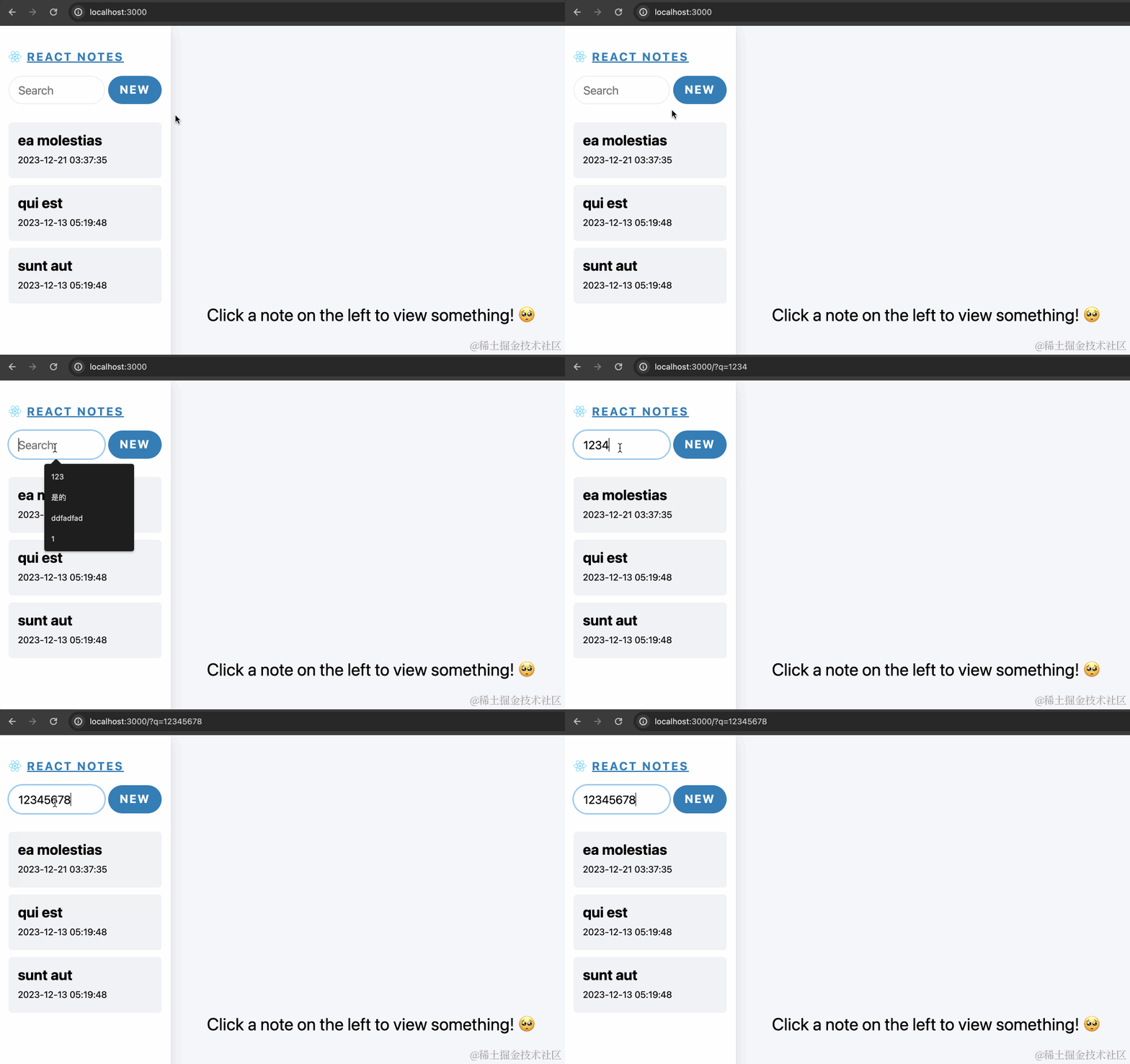
我们想要的效果是当在搜索框输入搜索文字的时候,URL 上添加对应的搜索参数,同时展示搜索后的笔记列表。当页面刷新的时候,如果有搜索参数,也会展示对应搜索后的笔记列表。效果如下:
现在让我们来实现吧。
#### 搜索输入框
首先是 `components/Sidebar.js`导入搜索栏组件:
```javascript
import React, { Suspense } from 'react'
import Link from 'next/link'
// 导入组件
import SidebarSearchField from '@/components/SidebarSearchField';
import SidebarNoteList from '@/components/SidebarNoteList';
import EditButton from '@/components/EditButton';
import NoteListSkeleton from '@/components/NoteListSkeleton';
export default async function Sidebar() {
return (
<>
 React Notes
)
}
```
`components/SidebarSearchField.js`代码如下:
```jsx
'use client';
import { usePathname, useRouter } from 'next/navigation'
import { useTransition } from 'react'
function Spinner({active = true}) {
return (
);
}
export default function SidebarSearchField() {
const { replace } = useRouter()
const pathname = usePathname()
const [isPending, startTransition] = useTransition()
function handleSearch(term) {
const params = new URLSearchParams(window.location.search)
if (term) {
params.set('q', term)
} else {
params.delete('q')
}
startTransition(() => {
replace(`${pathname}?${params.toString()}`)
})
}
return (
React Notes
)
}
```
`components/SidebarSearchField.js`代码如下:
```jsx
'use client';
import { usePathname, useRouter } from 'next/navigation'
import { useTransition } from 'react'
function Spinner({active = true}) {
return (
);
}
export default function SidebarSearchField() {
const { replace } = useRouter()
const pathname = usePathname()
const [isPending, startTransition] = useTransition()
function handleSearch(term) {
const params = new URLSearchParams(window.location.search)
if (term) {
params.set('q', term)
} else {
params.delete('q')
}
startTransition(() => {
replace(`${pathname}?${params.toString()}`)
})
}
return (
handleSearch(e.target.value)}
/>
);
}
```
`` 是一个客户端组件,因为只有在客户端组件中才能使用 [useRouter](https://juejin.cn/book/7307859898316881957/section/7309079651500949530#heading-58) 和 [usePathname](https://juejin.cn/book/7307859898316881957/section/7309079651500949530#heading-54)。在组件中,我们使用了 React 的 [useTransition](https://react.dev/reference/react/useTransition) hook,非常适合在这种频繁非紧急的更新中使用,有效防止造成阻塞。随着用户的输入,我们会不停的 `replace` 当前的 URL,添加搜索参数。
此时效果如下:
#### 笔记列表渲染
左侧的笔记列表需要根据网址上的搜索参数重新渲染,但其实这里并没有必要查询搜索接口,我们直接在客户端使用字符串的 [includes](https://developer.mozilla.org/zh-CN/docs/Web/JavaScript/Reference/Global_Objects/String/includes) 方法判断即可。
**尝试 1**
关键的问题在于获取网址参数。如果要获取参数,我们需要用到 [useSearchParams](https://juejin.cn/book/7307859898316881957/section/7309079651500949530#heading-68) hook,而这个 hook 需要在客户端组件中使用,我们尝试将 `SidebarNoteList` 声明为客户端组件:
```javascript
'use client'
import SidebarNoteItem from '@/components/SidebarNoteItem';
import { getAllNotes } from '@/lib/redis';
import {sleep} from '@/lib/utils'
import { useSearchParams } from 'next/navigation'
export default async function NoteList() {
await sleep(3000);
const notes = await getAllNotes()
// 获取网页搜索参数
const searchParams = useSearchParams()
const searchText = searchParams.get('q')
const arr = Object.entries(notes);
if (arr.length == 0) {
return
{'No notes created yet!'}
}
return
{arr.map(([noteId, note]) => {
const noteData = JSON.parse(note);
// 判断笔记标题中是否包含搜索字符
if (!searchText || (searchText && noteData.title.toLowerCase().includes(searchText.toLowerCase()))) {
return -
}
return null
})}
}
```
但是会报模块找不到错误:
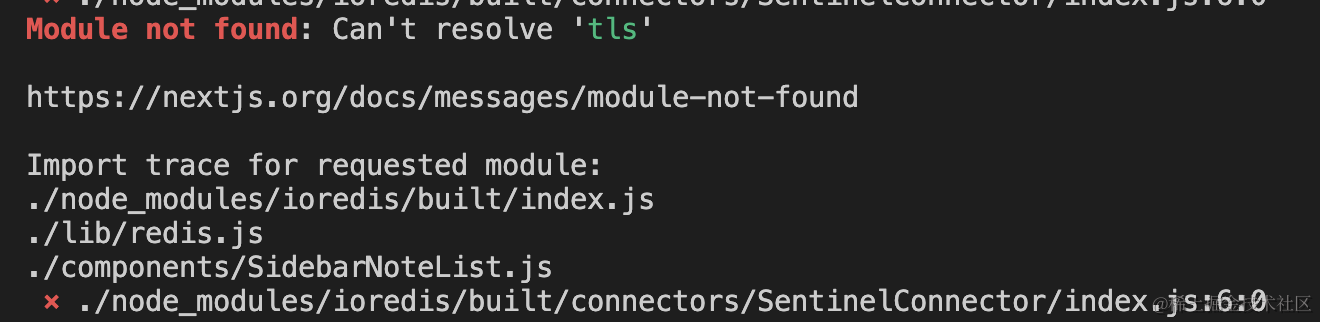
想想也是,毕竟我们在这个组件中用了 ioredis,原本应该在服务端运行,现在却被迫在客户端运行,可不是要罢工嘛……
**尝试 2**
为了避免错误,我们应该再抽离一个客户端组件,数据获取依然放在 `SidebarNoteList` 中,获取参数渲染笔记列表放在子组件中,我们将该组件取名为 `SidebarNoteListFilter`。
`/components/SidebarNoteList.js`代码修改如下:
```javascript
import SidebarNoteListFilter from '@/components/SidebarNoteListFilter';
import { getAllNotes } from '@/lib/redis';
import { sleep } from '@/lib/utils'
export default async function NoteList() {
await sleep(3000);
const notes = await getAllNotes()
if (Object.entries(notes).length == 0) {
return
{'No notes created yet!'}
}
return
}
```
`/components/SidebarNoteListFilter.js`代码修改如下:
```javascript
'use client'
import SidebarNoteItem from '@/components/SidebarNoteItem';
import { useSearchParams } from 'next/navigation';
export default function SidebarNoteListFilter({notes}) {
const searchParams = useSearchParams()
const searchText = searchParams.get('q')
return
{Object.entries(notes).map(([noteId, note]) => {
const noteData = JSON.parse(note);
if (!searchText || (searchText && noteData.title.toLowerCase().includes(searchText.toLowerCase()))) {
return -
}
return null
})}
}
```
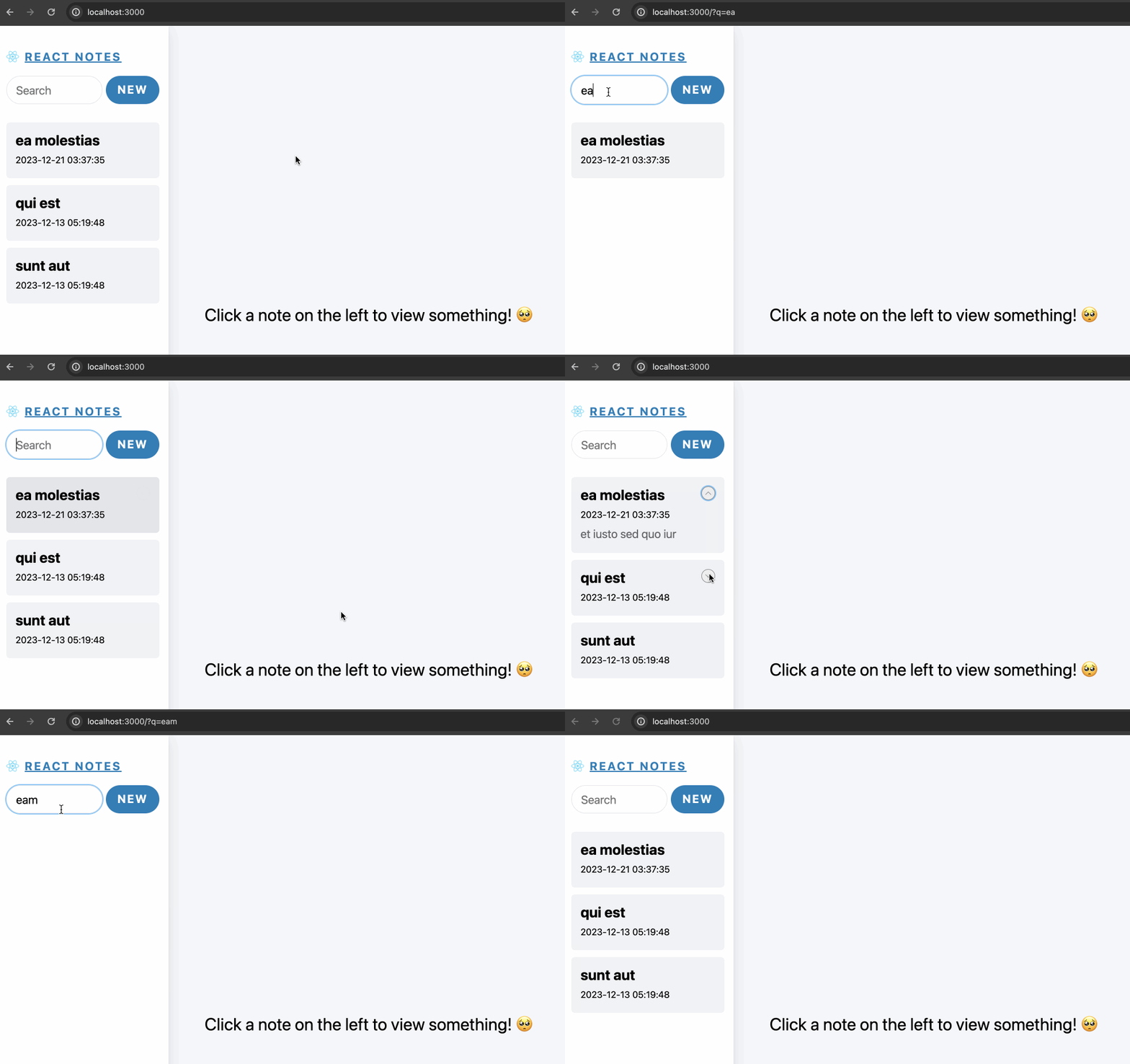
此时搜索功能可以正常运行了:
**尝试 3**
搜索功能看似可以正常运行了,但是有个问题,让我们查看下此时的源代码:
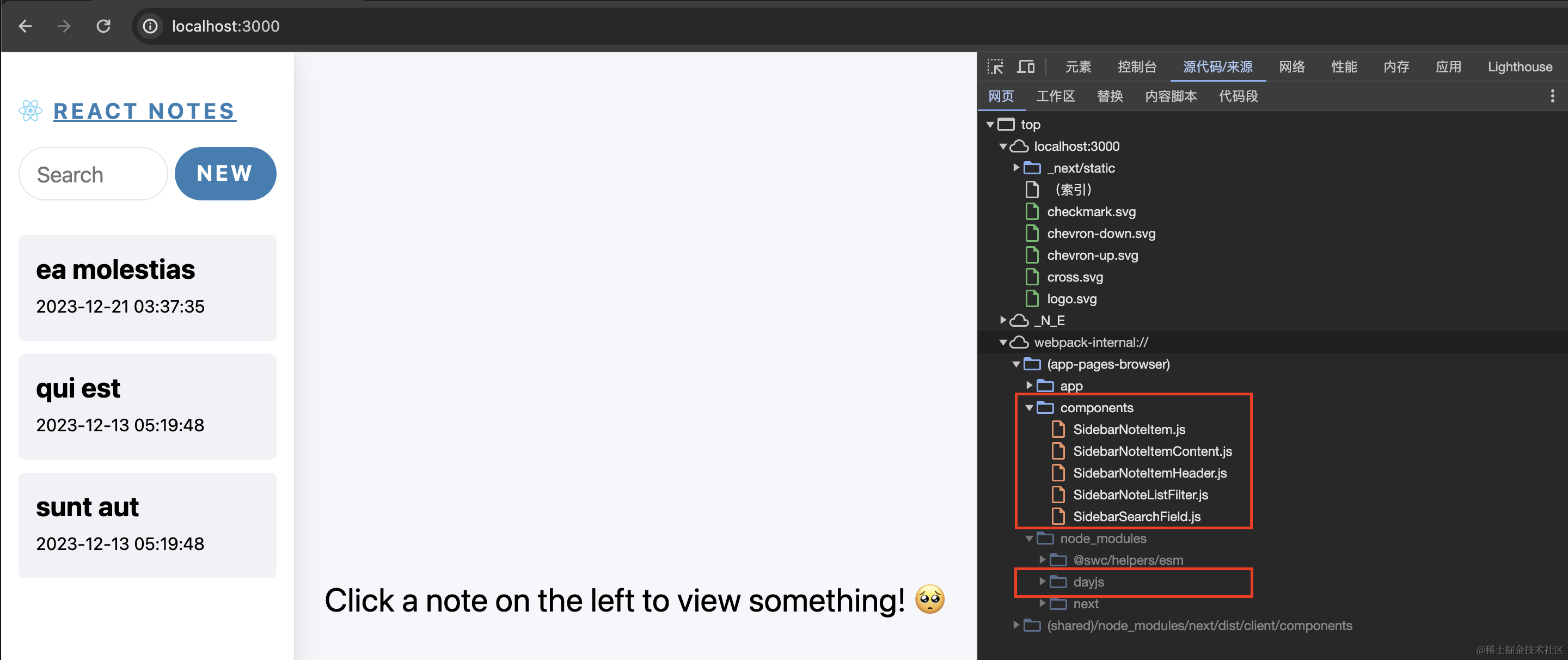
你会发现,原本应该服务端渲染的 `` 组件、`` 组件此时都变成了客户端组件,而且 ``中用到的 `dayjs` 也被打包到客户端 bundle 中。
我们在第二篇中辛辛苦苦抽离出 `SidebarNoteItemContent` 组件只为 `dayjs` 不被打包到客户端,现在因为实现搜索功能,都变成了客户端组件,功亏于溃,有什么方法可以避免 `dayjs`被打包到客户端呢?
注:其实 `dayjs`这个包并不大,打包到 bundle 中也没什么太大影响,但是想想之前的 `marked` 和 `sanitize-html`,它们却有几百 kB,这里想借这个例子来帮助大家思考如何避免不必要的代码被打包到 bundle 中。
让我们分析下问题,`dayjs` 为什么被打包到 bundle 中呢?因为 `SidebarNoteListHeader`被导入到客户端组件中,变成了客户端组件。我们其实应该通过之前讲过的 props 的形式,让 `SidebarNoteListHeader` 在服务端先渲染,然后再传给客户端组件。
惯用 React 的同学很容易想到使用 render props 的方式:
```jsx
{
return Object.entries(notes).map(([noteId, note]) => {
const noteData = JSON.parse(note);
if (!searchText || (searchText && noteData.title.toLowerCase().includes(searchText.toLowerCase()))) {
return (
)
}
return null
})
}}>
```
但是**从服务端组件到客户端组件传递的数据需要可序列化**,所以并不支持传入函数,使用这种方式是会报错的。
**尝试 4**
总的解决思路还是在服务端组件中进行渲染,然后传给客户端组件。我们可以在 `SidebarNoteList.js` 中将所有的笔记列表渲染出来,然后在 `SidebarNoteListFilter.js` 中进行处理。尝试一版,修改 `/components/SidebarNoteList.js`代码如下:
```javascript
import SidebarNoteListFilter from '@/components/SidebarNoteListFilter';
import SidebarNoteItem from '@/components/SidebarNoteItem';
import { getAllNotes } from '@/lib/redis';
import { sleep } from '@/lib/utils';
export default async function NoteList() {
await sleep(2000)
const notes = await getAllNotes()
if (Object.entries(notes).length == 0) {
return
{'No notes created yet!'}
}
return (
{Object.entries(notes).map(([noteId, note]) => {
return
})}
)
}
```
在这段代码中,`SidebarNoteItem` 会在服务端渲染后传给 `SidebarNoteListFilter`,因为 `SidebarNoteItem` 中引入了 `SidebarNoteItemHeader`,所以 `SidebarNoteItemHeader` 也会在服务端渲染,这样就避免了客户端打包 `dayjs`。
修改 `/components/SidebarNoteListFilter.js`代码如下:
```javascript
'use client'
import { useSearchParams } from 'next/navigation'
import { Children } from 'react';
export default function SidebarNoteList({ children }) {
const searchParams = useSearchParams()
const searchText = searchParams.get('q')
return (
{Children.map(children, (child, index) => {
const title = child.props.title;
if (!searchText || (searchText && title.toLowerCase().includes(searchText.toLowerCase()))) {
return - {child}
}
return null
})}
)
}
```
在这段代码中,我们使用了 React 的 `Children.map` 方法,在遍历的时候对标题进行了判断。
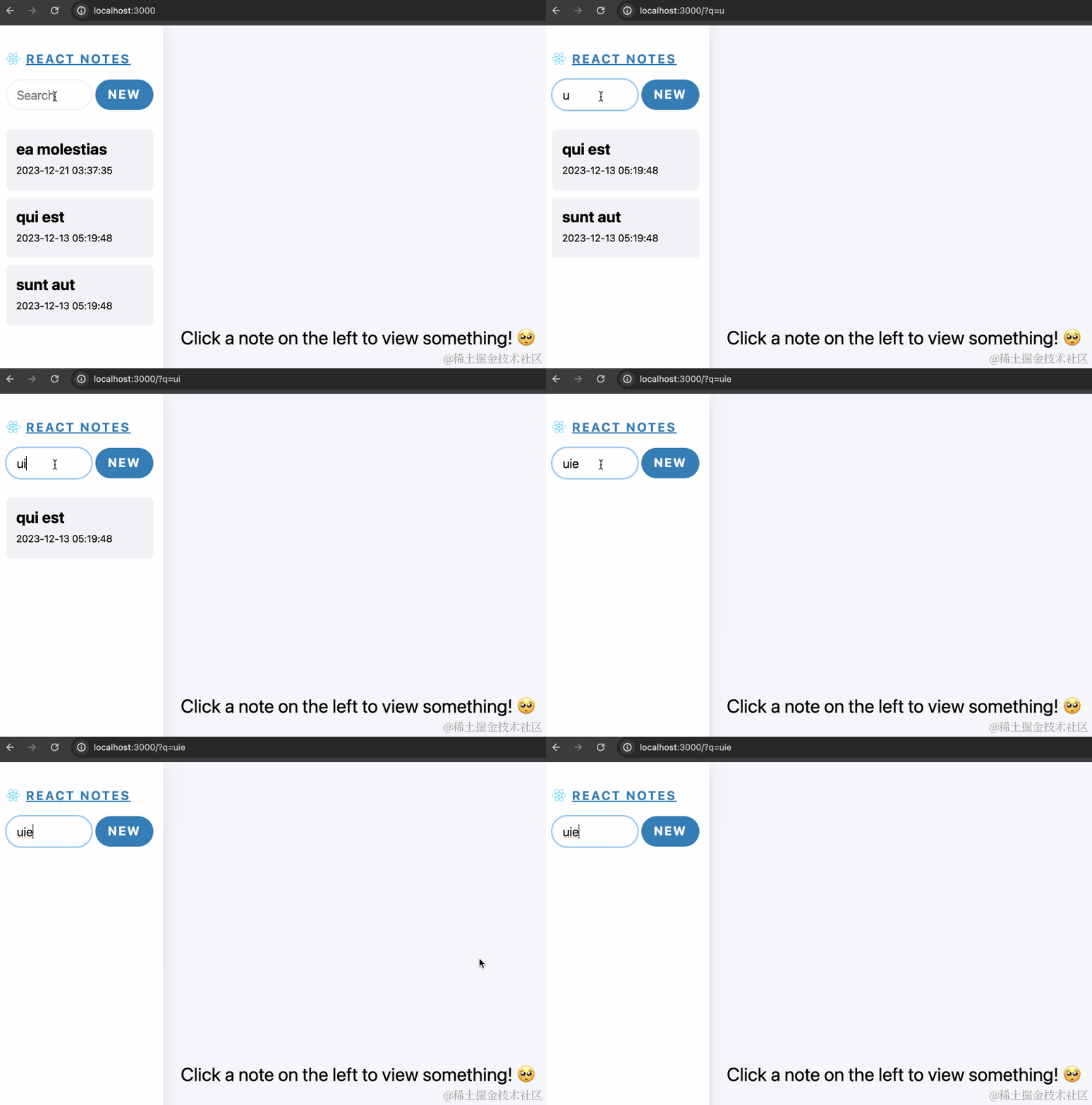
此时功能运行正常:
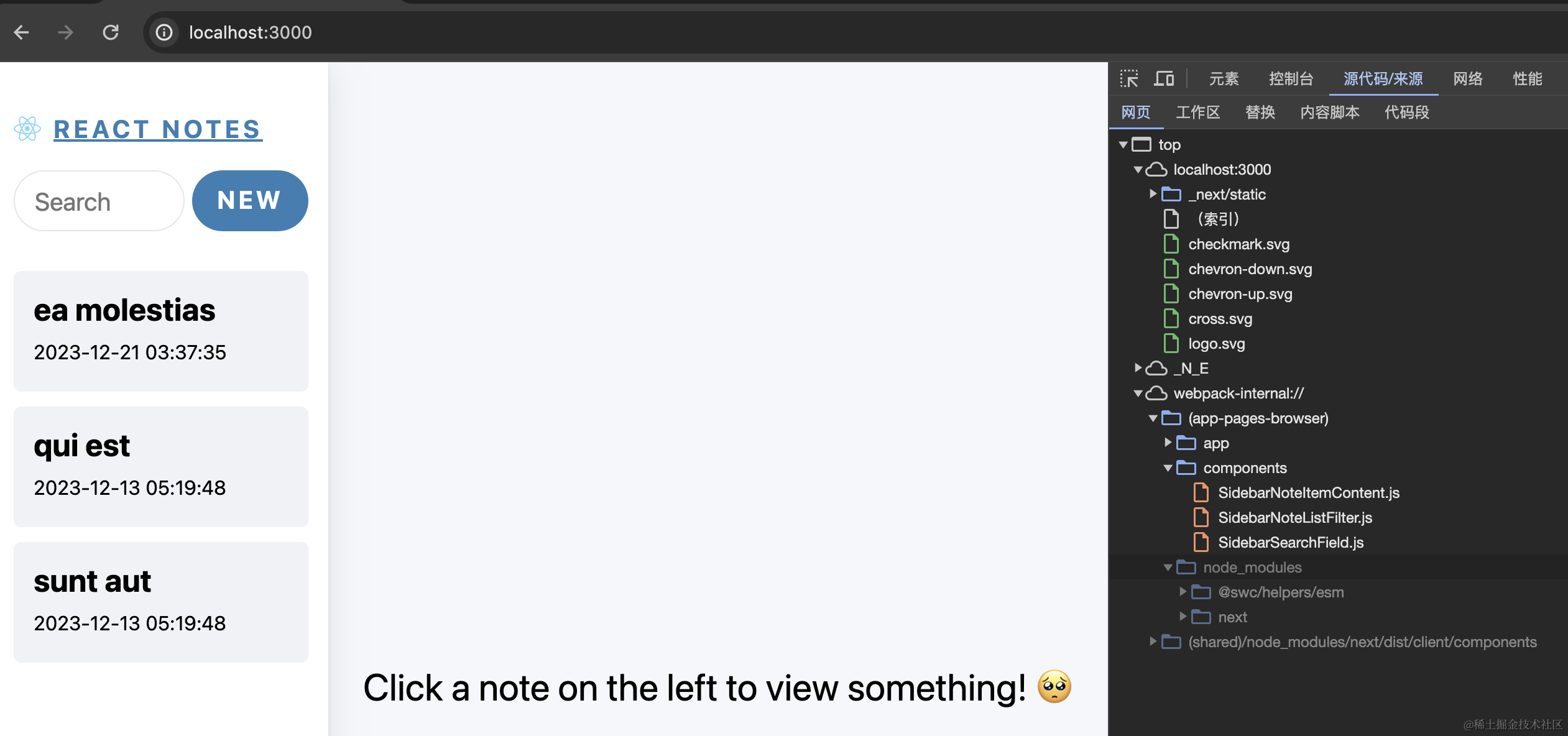
客户端也不会打包 `dayjs`:
**尝试 5**
上面的代码还有一个小问题就是 [Children](https://react.dev/reference/react/Children) 方法过时了……
React 认为使用 Children 会削弱代码的健壮性,同时 React 也提供了[替代方案](https://react.dev/reference/react/Children#alternatives),那就是改为接收对象数组作为 props。
想想也确实可以,如果是为了避免打包 dayjs,最核心的是将 dayjs 在服务端运行。我们在 `SidebarNoteList.js` 获取所有数据,然后把 header JSX 渲染好,再一起传给客户端组件`SidebarNoteListFilter.js`,在其中进行具体的判断处理。
修改 `/components/SidebarNoteList.js`代码如下:
```javascript
import SidebarNoteList from '@/components/SidebarNoteList';
import { getAllNotes } from '@/lib/redis';
import { sleep } from '@/lib/utils';
import SidebarNoteItemHeader from '@/components/SidebarNoteItemHeader';
export default async function NoteList() {
await sleep(2000)
const notes = await getAllNotes()
if (Object.entries(notes).length == 0) {
return
{'No notes created yet!'}
}
return (
{
const noteData = JSON.parse(note)
return {
noteId,
note: noteData,
header:
}
})
} />
)
}
```
修改 `/components/SidebarNoteListFilter.js`代码如下:
```jsx
'use client'
import { useSearchParams } from 'next/navigation'
import SidebarNoteItemContent from '@/components/SidebarNoteItemContent';
export default function SidebarNoteList({ notes }) {
const searchParams = useSearchParams()
const searchText = searchParams.get('q')
return (
{notes.map(noteItem => {
const {noteId, note, header} = noteItem;
if (!searchText || (searchText && note.title.toLowerCase().includes(searchText.toLowerCase()))) {
return (
{note.content.substring(0, 20) || (No content)}
}>
{header}
)
}
return null
})}
)
}
```
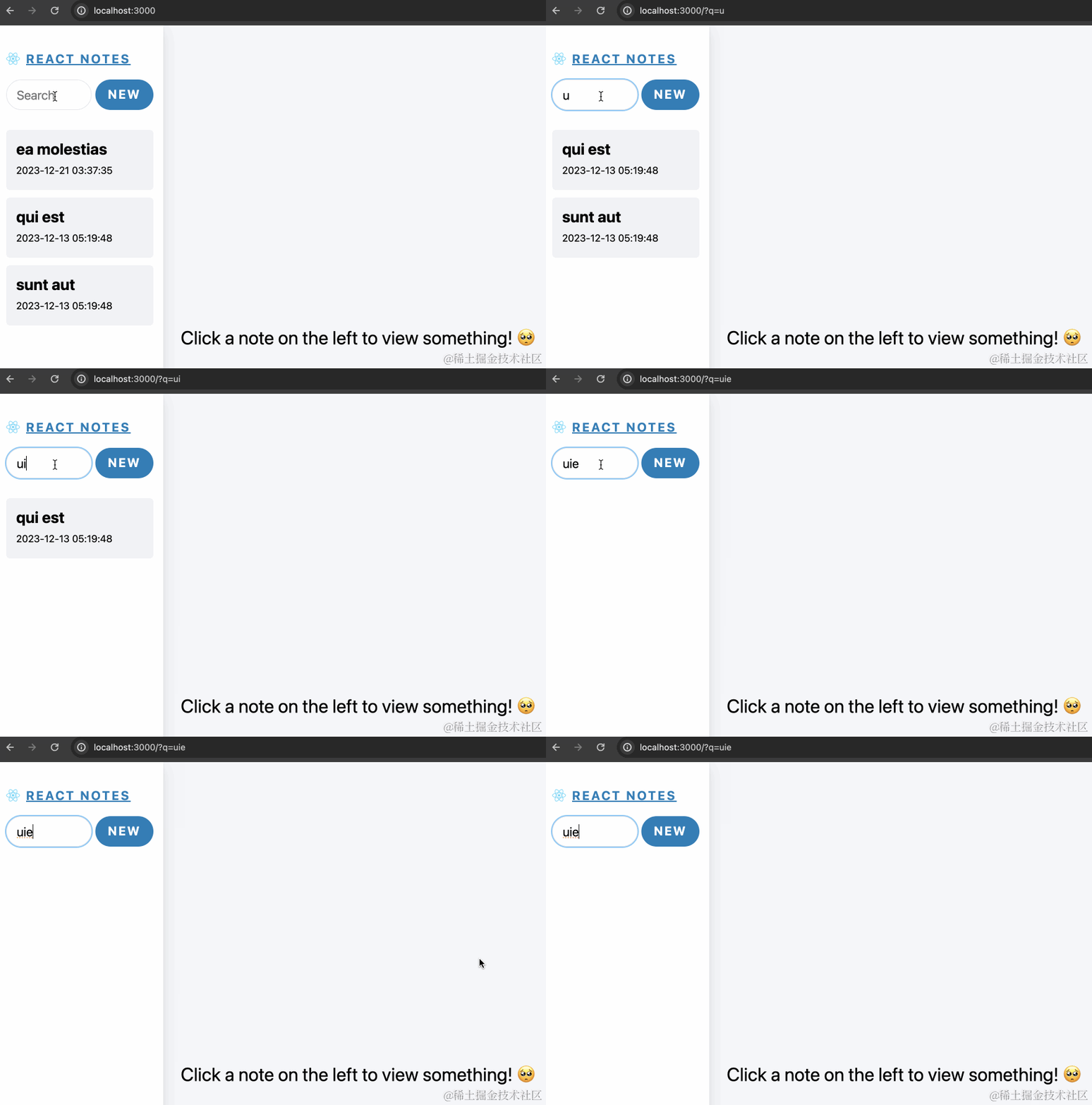
此时功能运行正常:
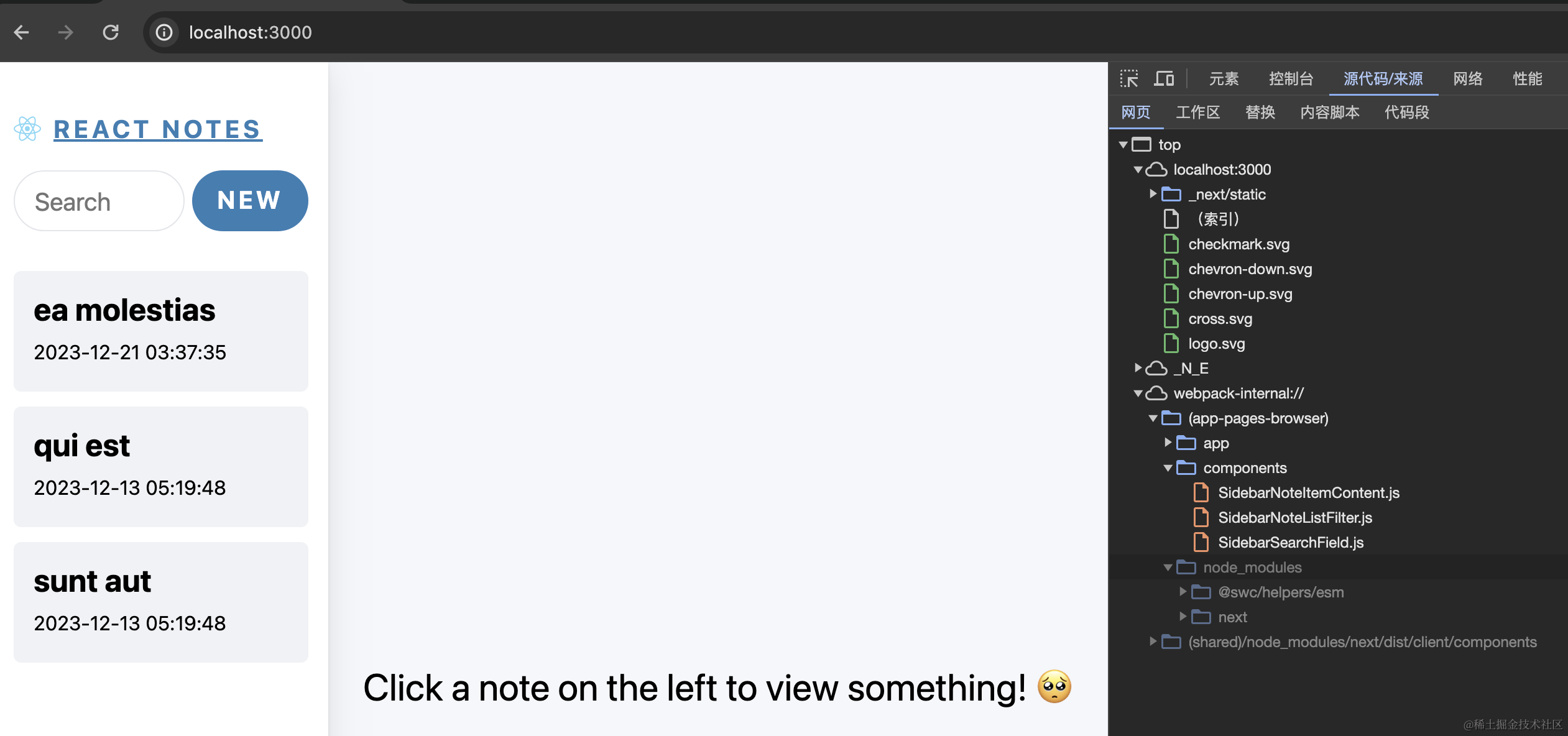
客户端也不会打包 `dayjs`:
### 总结
那么今天的内容就结束了,本篇的内容并不多,主要是实现搜索功能。至此,原 React Notes Demo 中的功能我们已经全部实现。
在 Next.js 中,使用 `usePathname`、`useRouter`、`useSearchParams` 等 hooks 都需要在客户端组件中,这就导致可能会打包不必要的代码到客户端 bundle 中,其解决的关键就是将组件尽可能运行在服务端,先在服务端渲染后再传给客户端组件。
本篇的代码我已经上传到[代码仓库](https://github.com/mqyqingfeng/next-react-notes-demo/tree/main)的 Day 5 分支:
* 尝试 2 Demo 在 [day5](https://github.com/mqyqingfeng/next-react-notes-demo/tree/day5) 分支
* 尝试 4 Demo 在 [day5-1](https://github.com/mqyqingfeng/next-react-notes-demo/tree/day5-1) 分支
* 尝试 5 Demo 在 [day5-2](https://github.com/mqyqingfeng/next-react-notes-demo/tree/day5-2) 分支
直接使用的时候不要忘记在本地开启 Redis。